Examples
Practical examples and use cases for SubdomainX.
Basic Examples
Single Domain Scan
Run a basic scan with all available tools on a single domain:
subdomainx example.comNote: Uses all available enumeration tools by default and generates JSON output
Multiple Domains Scan
Run a scan on multiple domains from a file:
subdomainx --wildcard domains.txtNote: Uses all available enumeration tools by default and generates JSON output
Specific Tools
Use only specific enumeration tools for targeted scanning:
Single domain:
subdomainx --subfinder --amass --findomain example.comMultiple domains:
subdomainx --wildcard domains.txt --subfinder --amass --findomainNote: Limits the scan to only the specified tools for faster execution
API Tools
Use API-based enumeration tools for enhanced discovery:
Single domain:
subdomainx --securitytrails --virustotal --censys --crtsh --urlscan --hackertarget example.comMultiple domains:
subdomainx --wildcard domains.txt --securitytrails --virustotal --censys --crtsh --urlscan --hackertargetNote: Requires API keys to be set as environment variables. Some APIs (crt.sh, HackerTarget) work without API keys.
Mixed Approach
Combine command-line tools with API tools for maximum coverage:
Single domain:
subdomainx --subfinder --securitytrails --waybackurls --linkheader example.comMultiple domains:
subdomainx --wildcard domains.txt --amass --virustotal --censys --waybackurls --linkheaderNote: Combines the speed of local tools with the breadth of API databases, historical data, and HTTP Link header discovery
Custom Wordlist Discovery
Use custom wordlists for targeted brute-forcing:
Single domain:
subdomainx --wordlist /path/to/wordlist.txt example.comMultiple domains:
subdomainx --wildcard domains.txt --wordlist /path/to/wordlist.txtPerformance Optimization
Limit HTTP scanning for large subdomain lists to improve performance:
Single domain:
subdomainx --subfinder --httpx --max-http-targets 500 example.comMultiple domains:
subdomainx --wildcard domains.txt --subfinder --httpx --max-http-targets 200Note: Use
--max-http-targetsto limit the number of subdomains scanned with httpx for better performance with large subdomain lists
Combined with specific tools:
subdomainx --subfinder --amass --wordlist /path/to/wordlist.txt example.comNote: Uses custom wordlist for brute-forcing with tools that support it (subfinder, amass, massdns, altdns)
With HTTP Scanning
Include HTTP scanning to discover web services:
Single domain:
subdomainx --httpx example.comMultiple domains:
subdomainx --wildcard domains.txt --httpxNote: Discovers web services, extracts titles, status codes, and technologies
Complete Scan
Full enumeration with both HTTP and port scanning:
Single domain:
subdomainx --httpx --smap example.comMultiple domains:
subdomainx --wildcard domains.txt --httpx --smapNote: Comprehensive scan including port discovery and service identification
Filtered Results
Filter results by specific status codes and ports:
Single domain:
subdomainx --httpx --smap --status-codes 200,301,302 --ports 80,443,8080 example.comMultiple domains:
subdomainx --wildcard domains.txt --httpx --smap --status-codes 200,301,302 --ports 80,443,8080Note: Only shows results with specified HTTP status codes and open ports
Advanced Examples
Custom Output Format
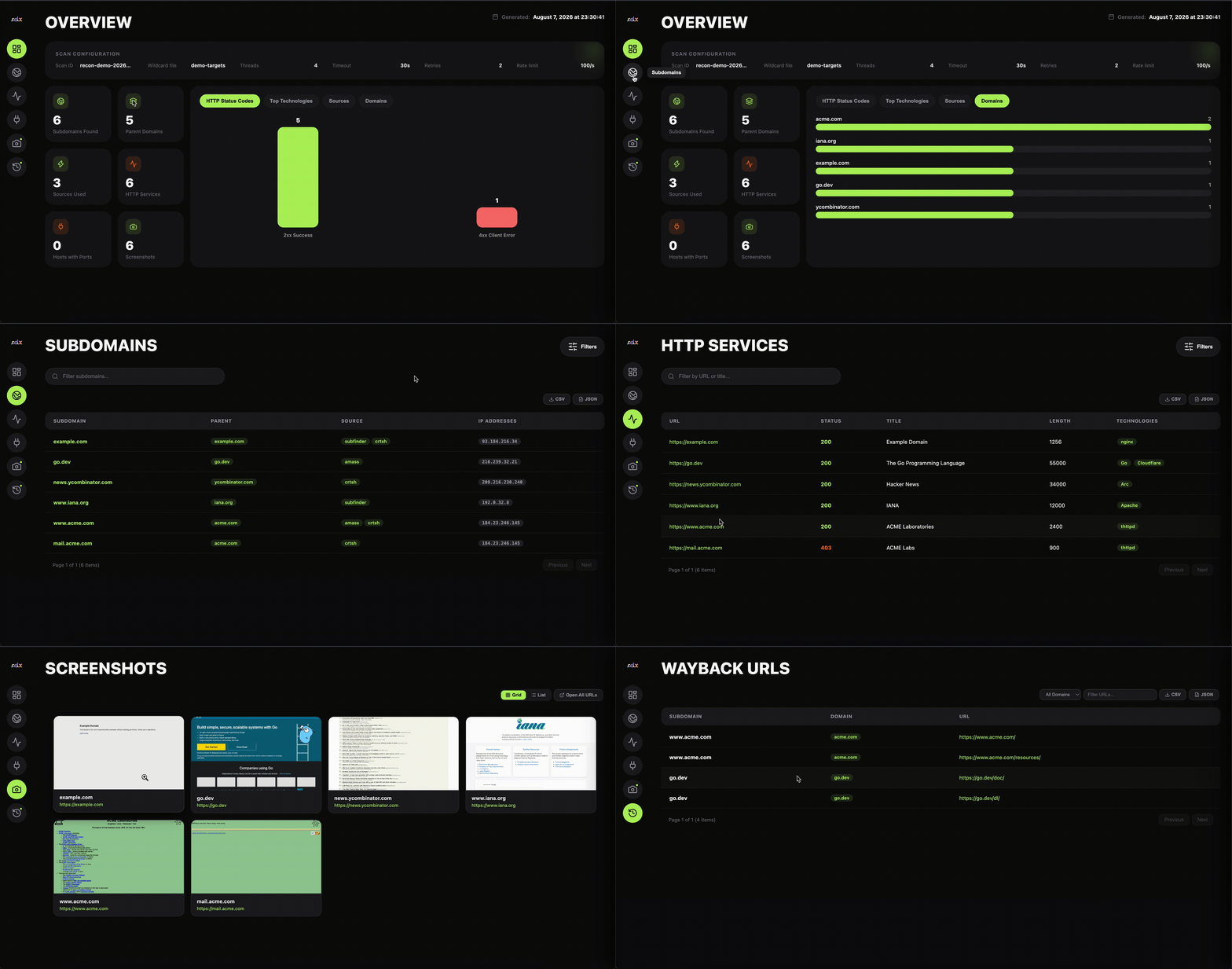
Generate a beautiful HTML report with custom naming:
Single domain:
subdomainx --format html --name my_scan --output reports/ example.comMultiple domains:
subdomainx --wildcard domains.txt --format html --name my_scan --output reports/Note: Creates an HTML report in the reports/ directory with custom filename
High Performance
Optimize for speed with increased threads and timeout:
Single domain:
subdomainx --threads 20 --timeout 60 --rate-limit 200 --max-http-targets 1000 example.comMultiple domains:
subdomainx --wildcard domains.txt --threads 20 --timeout 60 --rate-limit 200 --max-http-targets 500Note: Uses more threads, higher rate limits, and optimized HTTP scanning for faster execution
Verbose Output
Get detailed information about the scanning process with resource monitoring:
# Enable verbose mode for progress and resource monitoring
subdomainx --verbose --subfinder --amass example.com

# Monitor with custom wordlist
subdomainx --verbose --wordlist /path/to/wordlist.txt example.com

# Monitor with multiple domains
subdomainx --verbose --wildcard domains.txt --subfinder --amassNote: Shows real-time progress bars, ETA, memory usage, CPU cores, and goroutine count
Resume Interrupted Scans
Resume scans that were interrupted or failed:
List available checkpoints:
subdomainx --list-checkpointsResume from checkpoint:
subdomainx --resume my_scanResume with additional tools:
subdomainx --resume my_scan --httpx --smapNote: Checkpoints are automatically saved during scans and when interrupted with Ctrl+C. Resume functionality skips completed steps and continues from where it left off.
Single domain:
subdomainx --verbose example.comMultiple domains:
subdomainx --wildcard domains.txt --verboseNote: Shows detailed progress and debugging information
Custom Configuration
Use a custom configuration file:
Single domain:
subdomainx --config my-config.yaml example.comMultiple domains:
subdomainx --wildcard domains.txt --config my-config.yamlNote: Loads settings from a custom YAML configuration file
Advanced Filtering
Combine multiple filters for precise results:
Single domain:
subdomainx --httpx --smap --status-codes 200,403 --ports 80,443,8080,8443 --max-http-targets 500 --verbose example.comMultiple domains:
subdomainx --wildcard domains.txt --httpx --smap --status-codes 200,403 --ports 80,443,8080,8443 --max-http-targets 200Multiple domains:
subdomainx --wildcard domains.txt --httpx --smap --status-codes 200,403 --ports 80,443,8080,8443 --verboseNote: Filters for specific status codes and ports while showing detailed output
Sample Files
domains.txt
A simple text file containing target domains:
example.com
test.com
demo.org
sample.net
config.yaml
Custom configuration file:
threads: 15
timeout: 45
retries: 5
rate_limit: 150
output_format: html
output_dir: scans/
Best Practices
- Start Small: Begin with a few domains and specific tools to test your setup
- Use Appropriate Rate Limits: Set reasonable rate limits to avoid being blocked by services
- Monitor Resources: Keep an eye on system resources when using high thread counts
- Organize Output: Use meaningful names and organize output directories
- Verify Results: Always verify discovered subdomains and validate findings
- Use Filters: Leverage status code and port filters to focus on relevant results
- Combine Tools: Use both enumeration and scanning tools for comprehensive results
Technology Fingerprinting
Basic Tech Detection
Detect technology stacks on all HTTP-alive subdomains:
subdomainx --httpx --tech example.comNote:
--techautomatically enables--httpx. Detects web servers, frameworks, CMS platforms, CDNs, and more from headers, cookies, and HTML content.
Filter by Technology
Only show results running specific technologies:
Single domain:
subdomainx --httpx --tech --tech-filter "WordPress,nginx" example.comMultiple domains:
subdomainx --wildcard domains.txt --httpx --tech --tech-filter "WordPress"Tip: Use
--tech-filterto quickly find all subdomains running a specific CMS or framework for targeted testing.
Tech Fingerprinting with HTML Report
Generate a comprehensive report with technology breakdown:
subdomainx --httpx --tech --format html --name tech_audit example.comNote: The HTML report includes a technology distribution chart and filterable tech column in the HTTP results table.
Full Recon with Tech Detection
Combine technology fingerprinting with other scanning features:
subdomainx --subfinder --crtsh --httpx --tech --smap --format html --name full_recon example.comSubdomain Takeover Detection
Basic Takeover Check
Check all discovered subdomains for takeover vulnerabilities:
subdomainx --takeover example.comNote: Uses DNS CNAME lookups to identify dangling records pointing to unclaimed services (GitHub Pages, Heroku, S3, etc.).
Enhanced Detection with HTTP Scanning
Combine with HTTP scanning for more accurate detection using body-based fingerprints:
Single domain:
subdomainx --httpx --takeover example.comMultiple domains:
subdomainx --wildcard domains.txt --httpx --takeoverTip: HTTP-based detection catches cases where DNS alone is insufficient, such as services that respond with specific error pages.
Show Only Vulnerable Subdomains
Filter output to only show subdomains at risk of takeover:
subdomainx --takeover --takeover-only example.comTakeover Check with HTML Report
Generate a visual report with a dedicated Takeover tab showing risk levels:
subdomainx --httpx --takeover --format html --name takeover_audit example.comNote: The HTML report shows risk badges (HIGH, MEDIUM, LOW), CNAME targets, affected services, and evidence for each finding.
Bug Bounty Takeover Sweep
Comprehensive takeover check across multiple targets:
subdomainx --wildcard targets.txt --httpx --takeover --diff --notify slack --format html --name bb_takeoverTip: Combine
--takeoverwith--diffand--notifyfor continuous monitoring of takeover risks.
Screenshots
Basic Screenshot Capture
Capture screenshots of all HTTP-alive subdomains:
subdomainx --screenshot example.comNote:
--screenshotautomatically enables HTTP scanning (--httpx). Requires Chrome or Chromium installed.
Custom Resolution
Capture at full HD resolution for detailed reports:
subdomainx --screenshot --screenshot-resolution 1920x1080 example.comScreenshots with HTML Report
Combine screenshots with an HTML report for comprehensive recon:
subdomainx --screenshot --format html --name recon_report example.comOutput structure:
output/
├── recon_report_results.json
├── recon_report_report.html
└── screenshots/
    ├── www.example.com.png
    ├── api.example.com.png
    ├── staging.example.com.png
    └── admin.example.com.png
Screenshots with Specific Tools
Use specific enumeration tools and capture screenshots:
subdomainx --subfinder --crtsh --screenshot --max-http-targets 100 example.comTip: Use
--max-http-targetsto limit the number of screenshots when scanning large domains.
Diff/Monitoring
Compare Against Previous Scan
Detect new and removed subdomains since the last scan:
Single domain:
subdomainx --diff example.comMultiple domains:
subdomainx --wildcard domains.txt --diffNote: Scan history is automatically recorded. The first scan with
--diffwill show all subdomains as “new” since there is no baseline yet.
Compare Against a Baseline File
Compare against a specific previous results file:
subdomainx --diff --baseline output/previous_results.json example.comNote: The baseline file can be a JSON results file from a previous scan or a scan history entry.
Diff with HTML Report
Generate a diff alongside a full HTML report:
subdomainx --diff --format html --name weekly_scan example.comThis produces both the HTML report and a weekly_scan_diff.json with added/removed/changed subdomains.
Notifications
Send to a Single Channel
# Slack
subdomainx --notify slack example.com

# Discord
subdomainx --notify discord example.com

# Telegram
subdomainx --notify telegram example.com

# Email
subdomainx --notify email example.comNote: All credentials are read from environment variables. See CLI Reference for the full list.
Send to Multiple Channels
subdomainx --notify slack,email example.comDiff + Notifications
Alert on new/removed subdomains — ideal for continuous monitoring:
subdomainx --diff --notify slack example.comWhen combined with --diff, notifications include a summary of changes (new subdomains, removed subdomains, IP changes).
Continuous Monitoring Setup
Combine diff, notifications, and a cron schedule for automated monitoring. See the Deployment guide for full setup instructions.
# Set credentials once
export SUBDOMAINX_SLACK_WEBHOOK="https://hooks.slack.com/services/..."

# Run every 15 minutes via cron
*/15 * * * * subdomainx --diff --notify slack --output /opt/scans/ target.com
Interactive TUI Dashboard
Basic TUI Mode
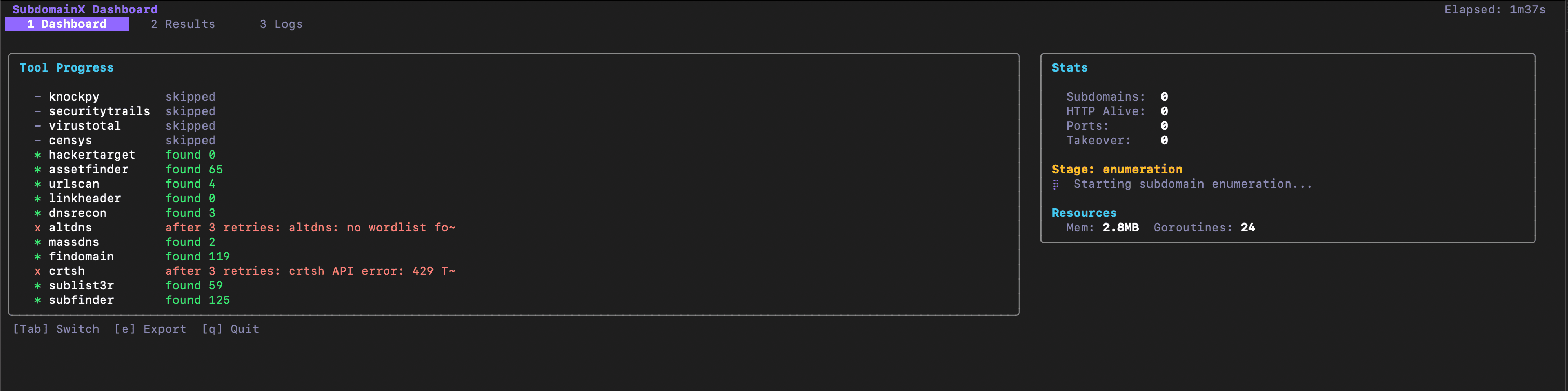
Launch the interactive terminal dashboard for real-time scan monitoring:
subdomainx --tui --subfinder --httpx example.comNote: The TUI provides a full-screen dashboard with live tool progress, stats, results table, and log viewer. Use
Tabto switch between views.
TUI with Full Recon Pipeline
Run a comprehensive scan with all features visible in the dashboard:
subdomainx --tui --subfinder --crtsh --httpx --tech --takeover --format html example.comTip: The Dashboard tab shows real-time progress for each tool, memory usage, and goroutine count. Switch to the Results tab to browse and filter discovered subdomains as they come in.
TUI with Multiple Domains
Monitor multi-domain scans interactively:
subdomainx --tui --wildcard targets.txt --httpx --smap --takeoverTUI Keyboard Shortcuts
| Key | Action |
|---|---|
Tab | Switch to next tab |
1 / 2 / 3 | Jump to Dashboard / Results / Logs |
s | Cycle sort column (Results tab) |
/ | Start filtering (Results tab) |
j / k | Scroll up/down |
e | Export info |
q | Quit |
Common Use Cases
Bug Bounty
Comprehensive subdomain discovery for bug bounty programs:
Single target:
subdomainx --httpx --smap --format html --name bugbounty_scan target.comMultiple targets:
subdomainx --wildcard targets.txt --httpx --smap --format html --name bugbounty_scanSecurity Assessment
Quick reconnaissance for security assessments:
Single domain:
subdomainx --subfinder --amass --httpx --threads 10 example.comMultiple domains:
subdomainx --wildcard domains.txt --subfinder --amass --httpx --threads 10API-Enhanced Discovery
Leverage external APIs for comprehensive subdomain discovery:
Single domain:
subdomainx --securitytrails --virustotal --censys --crtsh --urlscan --hackertarget --linkheader example.comMultiple domains:
subdomainx --wildcard domains.txt --securitytrails --virustotal --censys --crtsh --urlscan --hackertarget --linkheaderMaximum Coverage
Combine all available tools for maximum subdomain discovery:
Single domain:
subdomainx --subfinder --amass --securitytrails --virustotal --censys --crtsh --urlscan --hackertarget --waybackurls --linkheader --httpx --smap example.comMultiple domains:
subdomainx --wildcard domains.txt --subfinder --amass --securitytrails --virustotal --censys --crtsh --urlscan --hackertarget --waybackurls --linkheader --httpx --smapAsset Discovery
Discover all assets belonging to an organization:
Single domain:
subdomainx --format json --output assets/ example.comMultiple domains:
subdomainx --wildcard org_domains.txt --format json --output assets/Web Application Testing
Focus on web applications with specific status codes:
Single domain:
subdomainx --httpx --status-codes 200,301,302,403 --format html --name webapp_scan example.comMultiple domains:
subdomainx --wildcard webapps.txt --httpx --status-codes 200,301,302,403 --format html --name webapp_scanREST API Server Mode
Start SubdomainX as a REST API server and trigger scans programmatically:
Start the server:
subdomainx serve --port 8080 --api-key my-secret-key --output /opt/scansTrigger a scan via curl:
curl -X POST http://localhost:8080/api/scan \
  -H "Authorization: Bearer my-secret-key" \
  -H "Content-Type: application/json" \
  -d '{"domain":"example.com","tools":["subfinder","crtsh"],"options":{"httpx":true,"takeover":true}}'
Poll for results:
# Replace SCAN_ID with the ID returned from the POST response
curl http://localhost:8080/api/scan/SCAN_ID \
-H "Authorization: Bearer my-secret-key"Tip: Use the REST API to integrate SubdomainX into CI/CD pipelines, custom dashboards, or automated security workflows.
Port Scanning
Comprehensive port discovery for network assessment:
Single domain:
subdomainx --smap --ports 21,22,23,25,53,80,443,8080 --verbose example.comMultiple domains:
subdomainx --wildcard network.txt --smap --ports 21,22,23,25,53,80,443,8080 --verbose